In most cases, our developers come up with a rooting method for a new talked about Android device within a few hours. However, sometimes the hours turn into days and weeks especially if it is a new device from Verizon. The Samsung Galaxy devices from Verizon are have always proved a hard nut to crack for our developers. At the same time, however harder a nut might be, it is always finally cracked. While browsing the Verizon Note 3 section on XDA, I came across a thread where people are offering bounty for the guy who would successfully root this device and devise a method to bypass or unlock the bootloader.
Anyway, if you have the Verizon Galaxy Note 3 SM-N900V and you wish to root it, XDA forum member designgears has a big surprise for you. This talented guy has managed to crack the nut first. This simply means that you can now root your brand new device easily. It should be noted that this method given below gives you root access only. It does not unlock the bootloader or allow you to install a custom recovery. You will still have to wait a little before you can be able to install a custom ROM. By rooting your Note 3, you will be able to install apps that require root permission and thus enjoy better battery, performance and backup your apps with full data.
Disclaimer:
Following the rooting procedure will set your device status to custom and void its warranty. Also, the method described below is considered risky and therefore do not proceed unless you understand inherent risks. In case of any mishap, do not blame us or the developer for the same.
UPDATE
The Root de la vega method does not work any more! To root your Verizon Galaxy Note 3 SM-N900V on Jelly Bean and KitKat, use Geohot’s TowelRoot app.
Preparations:
- Download Odin 3.09 and extract the zip on your computer: Odin3 v3.09.zip
- Download the rooting package for Verizon Note 3 and extract it with 7Zip: Root_de_la_Vega-SM-N900V.7z
- Inside the extracted folder, you’ll find two files:
- Root_de_la_Vega.tar.md5
- Root_de_la_Vega.zip (unzip it too)
- Install the latest Samsung USB Drivers or Kies on your PC (skip if you have any of them already): Download
- Go to Settings> General> Developer options> USB Debugging and enable it by checking the box. If you do not find Developer options on your phone, go to Settings> General> About and tap the Build Number for 7 times. You can then see developer options under Settings.
- Rooting your Note 3 using this method will wipe all apps and data present on your device. We strongly recommend that you backup all important data to external SD card or computer. You can also use these apps to do the same.
- Charge your device to at least 50% of battery level.
Rooting Verizon Galaxy Note 3:
Having made all requires preparations, it’s time now to do the real action. Just follow the steps given below carefully.
- If you are using an external memory card on your Galaxy Note 3, remove it.
- Boot your Note 3 into Download Mode. To do this, turn off the device and then hold the Volume Down + Home + Power buttons at the same time for about 2-3 seconds. When you see the warning screen, press the Volume Up key to enter Download Mode.
- Open the Odin folder and launch the program.
- Connect the phone to your PC using USB cable.
- When Odin detects the device, you will “Added!!” text on the Message box on Odin.
- Now click the AP button on Odin and select “Root_de_la_Vega.tar.md5” file.
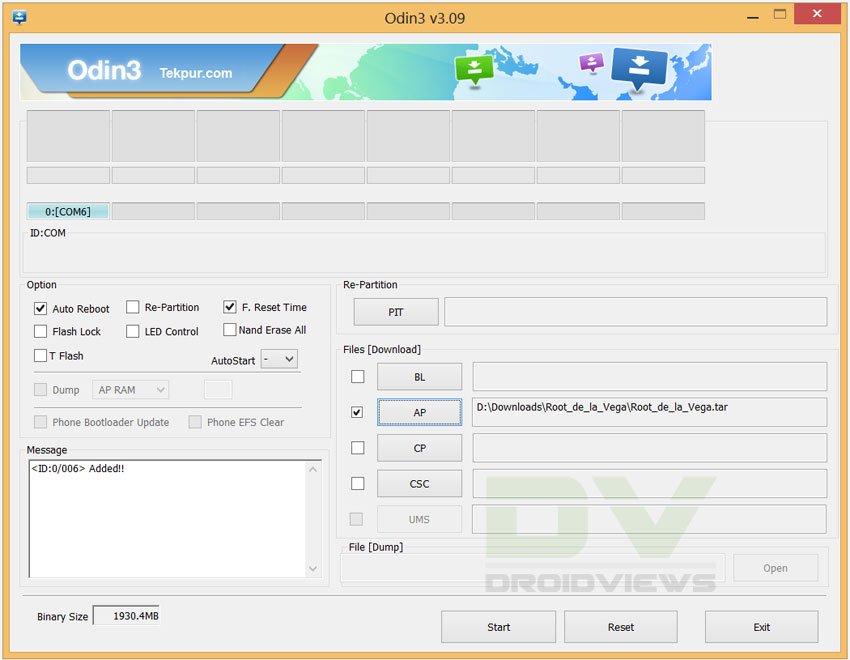
- Then click the Start button and wait till the installation is finished.
- Finally, you will see PASS!! message on Odin, signaling successful installation and then your device will reboot. Wait till it boots up normally.
- Now extract the “Root_de_la_Vega.zip” file and open the extracted folder. You’ll find 2 files inside it:
- root_files (folder)
- root_de_la_vega.sh
- Now connect your device to PC and copy both files to the internal SD card of your device.
- Then reboot your Galaxy Note 3. When the device boots up, go to file manager and delete the 2 files from your device.
- Finally, reboot your phone again. You can now insert your external SD card (if applicable).
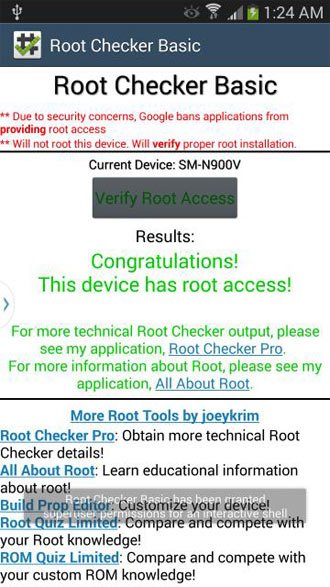
Your Verizon Galaxy Note 3 SM-N900V should now be rooted. To verify the root permission, install the Root Checker app from the Google Play Store and run it.
[googleplay url=”https://play.google.com/store/apps/details?id=com.joeykrim.rootcheck”]
Useful Articles:
Best Apps for Rooted Android Devices
Customize and Tweak Your Note 3 with Xposed Framework
Add Any App to Floating Pen Window on Galaxy Note 3
How to Install Official Firmware on Galaxy Note 3 (All Models)



Is There root for sm-900v on android 5.0?
No.
Towelroot NOT working on 4.4.4 Note 3 SM-N900V. Doesn’t work.
Can enable “Install from unknown Sources”
Then click INSTALL.
Get another warning not to install – Click I understand the risks, click OK to install…
Message is “App not installed and only option to click on is “DONE.”
🙁
this method soft-bricked my phone…
Any idea yet on how one can root, and then install custom ROMs on, a Verizon Note 3 SM-N900V (Android 4.4.2 and build ending in NC4)?
nonsense post its not true its fake grrrrrrrrrrr my phone died of this………………
failed due to Firmware upgrade encountered an issue error. I knew this was a bad idea. (:0P
I TRY YOUR METOD ADN MY NOTE3 IS BLOCLED OK A SCREEN FIRMWARE UPGRADE EMCUNTERED …WHAT SHOULD I DO??
See this: https://www.droidviews.com/how-to-install-restore-stock-firmware-on-samsung-galaxy-note-3-all-models/
what happens if it failed for Verizon? how do I get my phone back??
Worked perfectly!
Nice to know. 🙂