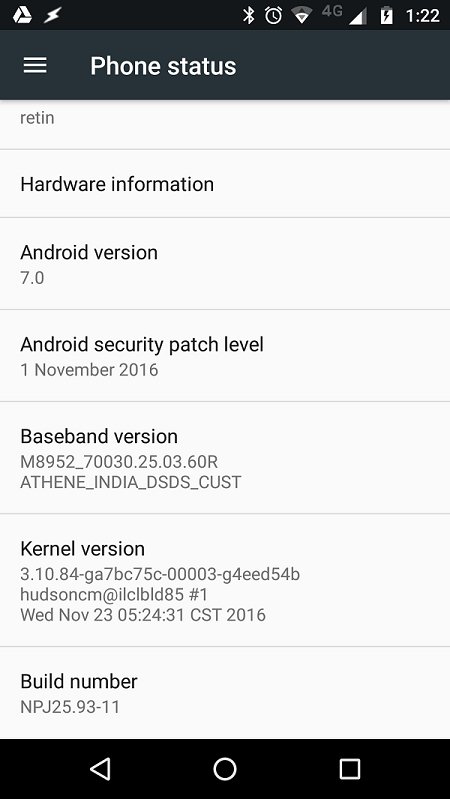
Motorola has announced the official Moto G4 Plus Nougat update back in October this year. Since then, they have released a soak test and nearly after a couple of months latest, the update finally started rolling out. The Nougat update is currently seeding to the users in India for the Moto G4 Plus XT1643. The update is based on Android 7.0 Nougat with the build number NPJ25.93-11. Alongside the bump in the Android version, the update also comes with the November 1 security patch.
The Moto G4 Plus Nougat update brings in improvements like the improved multitasking features, better notification controls, and battery optimization. You’ll also get the Doze mode, split-screen features along with a bunch of other important features. The OTA update is slowly rolling to the Indian users and it might take some time to reach your device. Luckily, one of the XDA users has managed to capture the official Moto G4 Plus Nougat update OTA. So, you can download the OTA and install it right away on your Android device. Before installing this update, make sure you’re on the latest Marshmallow firmware on your Moto G4 Plus.
Prerequisites
- Go to Settings » About phone » Build number and tap it 7 times to enable Developer options on your device. Then go back to Settings » Developer options and enable USB Debugging.
- Download the Minimal ADB and Fasboot Setup and install it on your computer.
- Install Motorola smartphone drivers on your PC.
- OTA installation doesn’t result in data loss. But make sure to backup important files on your device to a safe place just in case if you lose the data.
- Make sure you have enough charge on your device before starting the process.
Downloads
Moto G4 Plus Nougat OTA: Blur_Version.24.31.64.athene.retail.en.US.zip | Mirror 1 | Mirror 2
How to Install Official Moto G4 Plus Nougat Update [XT1643]
The OTA update can be installed in two ways, so we are giving you both the methods. Choose any of the methods to install the Nougat OTA on your device.
Method 1: Apply from SDcard
This method works best when you’ve stock recovery installed on your device. Don’t try it with any custom recovery unless you want to brick your device.
- Download the OTA file from above and transfer it to your device’s storage.
- Connect your device to the PC.
- Navigate to the folder where you’ve extracted the ADB and Fastboot files and open a command prompt by pressing Shift + Right-click on any empty space inside the folder and select Open command window here from the context menu.
- Use the below command to reboot your device to recovery mode.
adb reboot recovery
- Now select Apply update from SD Card and choose the zip file that you’ve downloaded in Step 1.
- Reboot the device once the installation is complete.
Method 2: ADB Sideload Method [Recommended]
- Download the OTA file and place it in the same folder where you’ve installed ADB on your PC.
- Connect your device to the PC.
- Navigate to the folder where you’ve extracted the ADB and Fastboot files and open a command prompt by pressing Shift + Right click on any empty space inside the folder and select Open command window here from the context menu.
- Use the below command to reboot your device to recovery mode.
adb reboot recovery
- In recovery mode, choose “ADB sideload” to start the sideload session for us to install the OTA file.
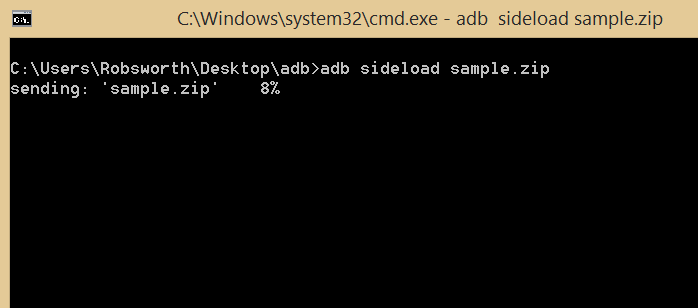
- In the command prompt, enter the following command to sideload the OTA zip to your device.
adb sideload <filename>
Replace the file name with the downloaded file name (Blur_Version.24.31.64.at…il.en.US.zip)
- You will see a progress bar in the command prompt indicating that the Zip file is being copied to the device. Once the file is transferred, the Zip is automatically installed on your device.
- Reboot the device after the installation process.
That’s it. You’ve successfully installed the official Nougat OTA on your Moto G4 Plus.


Join The Discussion: