
Instagram, the most popular photo sharing service has rolled out the 3D Touch feature to Android. The 3D Touch feature is one of the distinguishing features of the iPhone 6s, an awesome feature which operates on the pressure applied on the touchscreen. This feature uses a multi-layered screen with pressure-sensitive sensors which distinguish between the touch sensitivities. On iPhone 6s, this feature is used to show the preview of objects on simple touch and pressing harder fully opens it.
Instagram has included this feature in the last month’s update but pulled it off for unknown reasons. Surprisingly, this feature surfaced again in the latest v7.14.0 version and is available for download in the Google Play Store. This feature uses a simple trick of short & long presses, unlike the hard & soft pauses in iPhone. Well, as you can guess, this is due to the hardware restrictions in the Android devices.
However, this new feature in Instagram is quite smooth and allows users to the ‘Peek and Pop’ gestures based on the touch duration, So, you can now simply long press any image in Instagram and it will automatically expand and shows a larger preview along with options to like, share and comment. When the image expands, simply drag the finger to any of the options to directly comment, share or like an image. Once the user removes the finger from the screen, the image will shrink back to regular size.
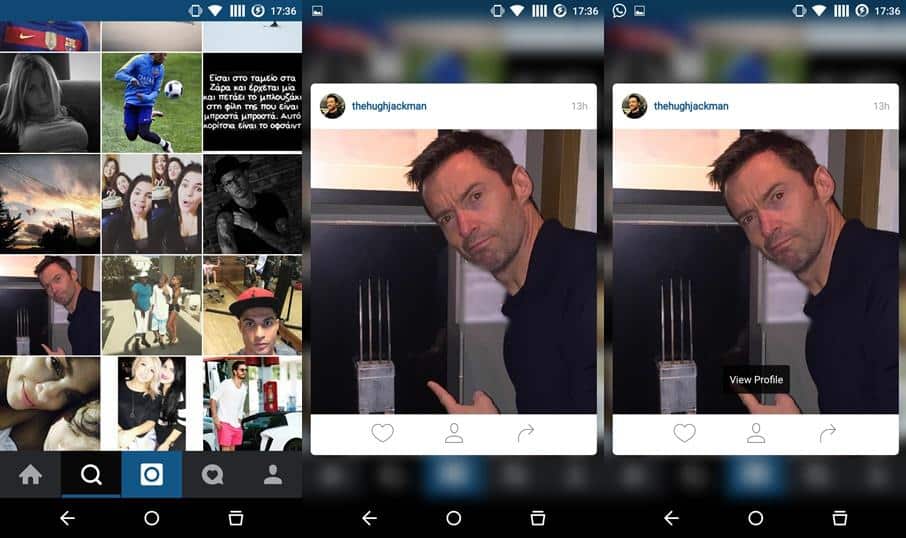
You can also simply opt for the old-school tap and expand feature as well, but trust me, the 3D touch-alike feature is so awesome that you won’t use the normal method anymore. The preview transitions are smooth and quite eye-pleasing, just give it a try. The latest version can be downloaded directly from the Google Play Store link from below.
[googleplay url=”https://play.google.com/store/apps/details?id=com.instagram.android”/]Once the latest version of Instagram is installed, open your favorite images by just holding the preview a bit longer. Let us know how you liked the new 3D touch feature in Instagram for Android.



Join The Discussion: