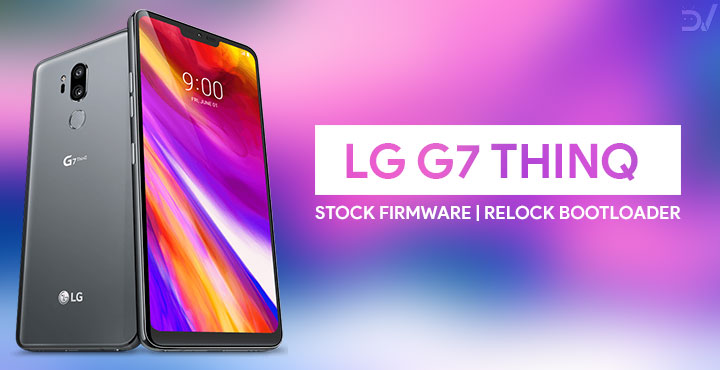
It’s been a while since the LG G7 ThinQ was launched. There are methods to unlock the bootloader, install TWRP and root the device. Naturally, there are also quite a few mods and custom ROMs that you can try out. There aren’t nearly as many of those as one might like though. So if you’re done with the dark side and want to return, we have just the guide for you. Today, we will see how you can flash stock firmware on LG G7 ThinQ and re-lock bootloader afterward.
The LG G7 ThinQ features a Snapdragon 845 SoC. The display is a 6.1-inch 19.5:9 3120 x 1440 pixel notched LCD panel. The LG flagship arrived with Android 8.0 Oreo out-of-the-box. There’s 4GB of LPDDR4X RAM and 64GB of onboard storage on the G7 ThinQ. The dual camera set up on the back features a 16MP primary Super Wide Angle sensor with a f/1.9 aperture. The lens used on this is a 107-degree wide angle lens. The secondary sensor is also a 16MP sensor but with a f/1.6 aperture and a 71-degree lens. The front of the device features an 8MP f/1.9 sensor with an 80-degree lens. A 3000mAh battery powers the entire set up.
Warning
Flashing the stock firmware wouldn’t void your warranty if it’s not already void. However, flashing the stock firmware on your LG G7 ThinQ with the following method will wipe all your data from the device. So make sure you backup all your important data before proceeding.
Requirements
- LG G7 ThinQ.
- A PC
- LG USB Drivers (download below)
- ADB & Fastboot (download below)
Downloads
- LG UP Tool: You can download the latest LG UP Tool, LG UP common.dll, and UPPERCUT from our dedicated LG flash tool download page.
- Stock Firmware KDZ: G710EM10b_00_0521.kdz
- Drivers: LG USB Drivers
- ADB & Fastboot: If you don’t have ADB & Fasboot set up on your PC, you can follow our guide for the same.
Install Stock Firmware on LG G7 ThinQ & Re-lock Bootloader
- Download LGUP from above and install it on your PC.
- Download LGUP_common.rar and extract it, you’ll get a file named LGUP_common.dll.
- Move the LGUP_common.dll file to C:\Program Files (x86)\LG Electronics\LGUP\model\common. Manually create the folders that don’t exist. The common folder will more than likely have to be manually created. Placing the file in the right place helps LGUP to identify your device.
- Run LGUP tool by running the UPPERCUT_1.0.0.0.exe.
- Now you will need to boot your LG V30 into download mode. To do this first turn off your phone. Now press and hold the Volume Up button. Connect your phone to the PC with a USB cable while holding the Volume Up button. If everything is properly set up, LGUP will not warn you, if not, it will ask you to connect your phone. You should check the USB connection and the drivers if that happens.
- You should see Firmware Update written on top of your screen now as your phone boots into download mode.
- Drag and drop the downloaded firmware KDZ into the File Path section of LGUP.
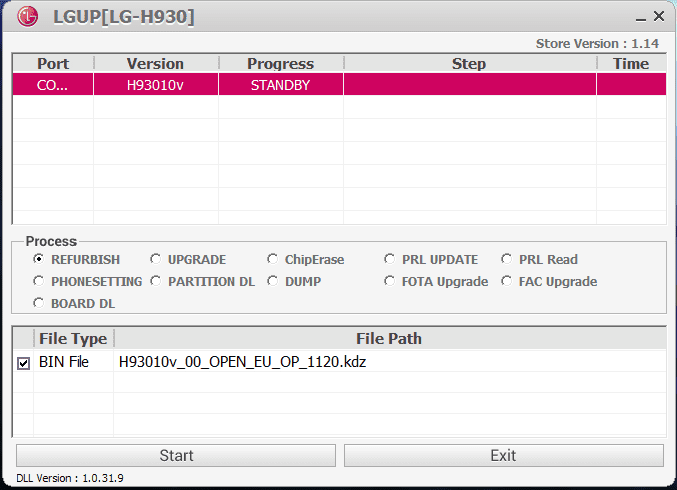
- The KDZ file should now be visible under the File Path section. Click on the Start button when you’re ready and the flashing process should begin. It may take a while so be patient and do not unplug the phone during the process. It may restart a few times as well. When everything is complete your device will reboot normally.
Re-lock bootloader on LG G7 ThinQ
- Navigate to your adb folder. Generally, this is C:/platform-tools/ or C:\ProgramData\Microsoft\Windows\Start Menu\Programs\Minimal ADB and Fastboot\ if you’ve installed minimal ADB & Fastboot. Once inside the folder, type cmd in the address bar and hit Enter. You can also hold Shift, right-click on an empty space and select Open PowerShell window here.
- Since you’ve flashed the stock firmware again, you’ll have to enable USB Debugging again in the Settings.
- Once everything is ready, reboot your device into bootloader mode with this command:
adb reboot bootloader
- To lock the bootloader, use the following command:
fastboot oem lock
- Next, reboot your device with this command:
fastboot reboot
Done! You have successfully flashed the stock firmware on LG G7 ThinQ and re-locked its bootloader.


Join The Discussion: