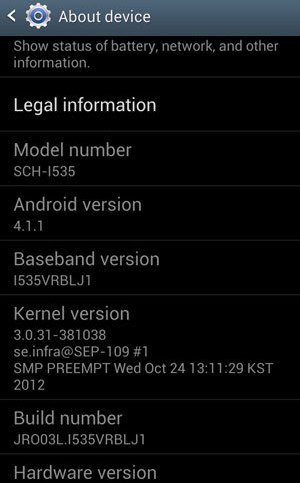
We are already aware of the mishaps with carrier variants of smartphones, either there are limitations or if not, then leaks like this one.
Late yesterday scrosler@XDA, who is a Recognized Developer posted the leaked 4.1 Jelly Bean update for the Verizon Samsung Galaxy S3. Since this is not an official release by the Verizon itself, we don’t claim any specific updates & features but in regard with the word “update”, we shall say that either it’s a bug fixed release or maybe with some updated goodies. According to scrosler & his sources, this is most probably the final OTA build package.
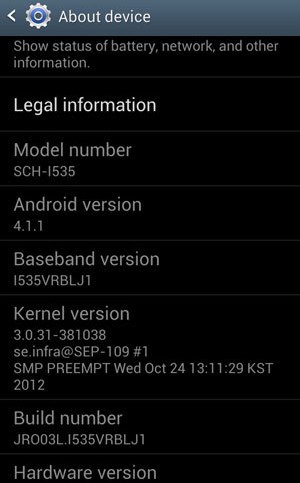
Now, there is something I want you (users) to take note of, this is not at all considered as an official release by Verizon. So, anything that you do with your device is on the sake of your own risk. Apart from this, I would personally like to advise you with a little experience of my own, “Don’t proceed with anything without knowing what you are doing & what will be its consequences”. If you understand the risk & harm that this can cause to your device, then only you should proceed further with its details.
It has been made available in two variants aka “odexed” & “de-odexed” versions. Further, some extra features: Rooted, Busybox, zip aligned, init.d support & adb as root have also been included.
What is “Odexed” & “deodexed” version?
- “.odex” is in short for “optimized dalvik executable” file which is similar to windows executable (.exe) file. An odex file is a compressed form which contains pieces and bits of its Android apk which is optimized/ processed on the Android boot to speed up the boot process. So, an “odexed” version of the ROM is the one that contains “.odex” file for each of its apk which generally makes it very difficult to modify/ edit the specific apk.
- “deodex” is not a file extension, rather it means that the “.odex” file has already been assembled and all the apk bits are put inside the classes.dex file which is found in the apk file itself. Hence, a deodexed version of the ROM is more preferable if you intend to modify any of the ROM apks in future.
The update is available as a flashable zip format which is ready to be flashed with a custom recovery such as CWM etc.
How to Flash
- Download the preferred version from scrosler’s website.
- Connect Your device to the PC via USB.
- Drag the downloaded .zip update to your SD card.
- Disconnect the device.
- Reboot your device into recovery by pressing volume up + home + power button together simultaneously until you see the blue colored recovery text.
- Select the “Install Zip from sdcard” option & then “choose zip from sdcard”
- Now, look in the place where you placed the downloaded zip and flash it
- When done, the recovery will notify you.
- Select the “wipe data/factory reset” option
- Select “reboot system now”
- Done! You have successfully flashed the leaked 4.1.1 Jellybean update on your Verizon Samsung Galaxy S3



Join The Discussion: