If you’re a proud owner of the Sony Xperia Z3, then we are sure that you would have more than enjoyed flaunting the magnificent beast in front of your friends. However, in a matter of days you wouldn’t find anything new to show to your buddies, so Custom ROMs might have got your attention. Being a top class device, the Xperia Z3 has a good amount of custom ROMs and mods that will make the device new and dazzling every day. You might have enjoyed installing some beautiful mods and ROMs on your device.
However, if you’re tired of the custom ROMs and want to return to the stock Xperia Z3, then we are here to guide you on how to install the stock FTF firmwares on your Xperia Z3. Reverting back to stock will bring back all the memories you first had with your Xperia Z3 when you powered it ON for the first time. Another good reason for getting back to the stock is to regain the Warranty if you are still covered, as Rooting and such unauthorized activities will void your warranty and you might be in need to pay a visit to Service center.
So if you’re willing to return to the stock experience on your Xperia Z3, then let’s get on with the guide.
WARNING
This Guide is intended only for the Xperia Z3 devices not for any other device of Sony. You alone are responsible for any consequences that might occur during the process. DroidViews or any of its community members shall not be held responsible for any damage to your device.
PREPARE YOUR DEVICE
- Charge your Xperia Z3 above 60% battery level to avoid shutdowns during the process.
- Backup your device storage, Contacts, SMS etc. using Google Sync service or any third-party app.
DOWNLOAD FIRMWARES
Download the Firmware package that is suitable for your device.
Firmwares for D6603
Unbranded Generic 23.0.A.2.93
- Generic Global
- Generic France
- Generic Germany
- Nordic Countries
- Generic Spain
- Generic Russia
- Generic Italy
- Generic UK
Branded 23.0.A.2.105
Branded 23.0.A.2.93
Firmwares for D6653
Generic 23.0.A.2.93
INSTALL STOCK FIRMWARE ON SONY XPERIA Z3
- Download the Sony FTF flash tool and install it on your PC → Click Here
- Download the required firmware file from above links and paste the FTF file in the C:/Flashtool/firmwares directory.
- Now open the Flash Tool and select the FTF package you want to install on your Sony Xperia Z3.
- Click on the Flash button at the lower right corner of the tool.
- You’ll get a prompt asking you to go to Flashmode or Fastboot mode, choose Flashmode.
- You should see the screen similar to this before flashing:
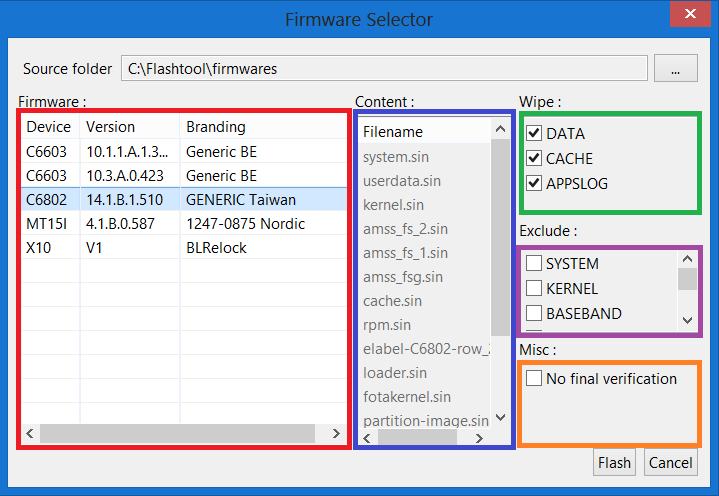
- Now click on the Flash button to flash the FTF file on your device.
- The tool asks you to connect the device in the flash mode. To boot to the flash mode, connect your powered off device to the PC while holding volume down button.
- Once the device is detected, the firmware will be flashed. Wait for the process to complete and then reboot.
That’s it, after the reboot you’ll see the stock Sony Xperia Z3 in your hand.
Leave your feedback in the comments section below.



i have a D6603 but in Romania,so which i must download? global?
Bro,can i use these firmware update without pc?
bro i have no service problem in lollipop 5.1.1 is this fix my z3
Try a factory reset first.
tried…no use..trying to downgrade it give system.sin finished with errors….help me bro..ill donate money..thats the range of my problem
bro there is no ftf file in generic india rom. but there are many more files after extracting
I have an unbranded Xperia Z2 from the Netherlands, when the lollipop update came out I didn’t want to wait so I flashed the unbranded German version. Now I want to do a regular update via Sony PC Companion but now I can’t because I have a modified rom. Is it because I have an unlocked bootloader? How can I reset the device so I can update via OTA or PC Companion?
EDIT: I have a D6503
Can I use the unbranded ROM on a Network Branded device – just to remove the Bloatware and get back to ‘true’ Stock? I have a D6616 and all the T-Mobile branding is driving me nuts!
Don’t try that. Root the phone and then you will be able to get rid of bloats. You can also try this: https://www.droidviews.com/disable-bloat-apps-on-android-devices-without-root/
the page is not available for firmwares for d6633. can anyone help please ..thanks
Sorry, we don’t have the file now.
is there any link for that file?
I already searched before replying you. Let me know if you find it.
Ok .let me know if you find that file. Thanks
how about the d6616 can’t find an ftf anywhere
Hello i know this was a month ago but are you still looking for the T-Mobile D6616 stock firmware? Here it is: http://forum.xda-developers.com/z3/general/ftf-stock-firmwares-xperia-z3-models-t2886061
Does this work in Singapore also?
Generic 23.0.A.2.93
Yes.
Generic 23.0.A.2.93 (Generic India) – does work on philippines?
Yes.
dude where can i get 23.0.1.A.5.77 ftf for my xperia z3 d6653
YOU can reply using 8883136025 its my number,thanks in advance ,damn need that ftf file
does your phone need to be rooted for this
No.
how to install drm keys
I have a D5803 with standard non-unlocked firmware Unbranded Generic 23.0.A.2.98 (instead of 23.0.A.2.93 provided here)
Is there a link to that standard firmware?
Download from here: http://forum.xda-developers.com/showpost.php?p=55468742&postcount=1
Thanks for this nice tutorial.
Those ROMs works with brazilian phones (D6633 dual chip) and let me to choose portuguese as default language?
Yes. Install this firmware: https://cloud.mail.ru/public/de591f9a9a33%2FD6633_23.0.F.1.74_1288-7362_R8B_RU.ftf
When I follow the link it leads me to a russian page and I can only read the 404 number. I’m far away from read russian texts hahaha…