
If you love to change the fonts of your Android device often, here is a mega-collection of 100 beautiful fonts for you. All these fonts have been packed in .mtz format to easily change the font of your Android device on MIUI. Most of the fonts have been packed by EndlessDissent from MIUI US forum. Each font file contains two preview images inside it. So you can easily view them before applying. What are you waiting for? Just jump to the download link below and download custom fonts for MIUI ROM from below.
How to Use:
What you have to do is to download the fonts and copy the MTZ to the MIUI/Themes folder on your devices internal SD Card. You can then go to the Theme Manager> Edit Theme> Font> select font> View preview> Apply font. If you are using MIUI V4 ROM, open Theme> Mixed> Font> Select> Apply font> Reboot device.
Want More Fonts? See These Posts:
Download Flip Font Collection for Samsung Galaxy Phones
Download And Install Custom Fonts on Android ICS/JB Devices
Note: Many of these Custom fonts for MIUI may not be compatible with MIUI V4. I will soon release a separate collection for MIUI V4. If you want any font of your choice for your device, give me the link and I will do it for you.
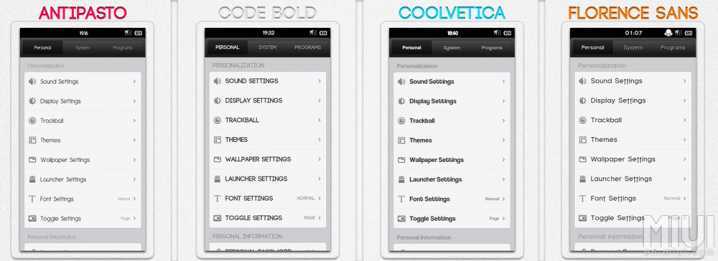
All these custom fonts for MIUI ROM are in MTZ format. You need to download the file, copy it to your device and then install it. You can also change the fonts from theme settings on all devices running MIUI ROM.
I have tested all these fonts personally. I really think that applying new custom fonts on MIUI adds a sense of novelty to it. Try the fonts provided above and let us know what you think about them.
See Also: 10 Things I Hate About Android – By an Android Fanboy



If you are ftping from Mac OS X, make sure you turn off firewall settings.
my miui v4 do not have the selection for font under mix tab
Same here. For the last 4 weeks, the font support seems to have been removed from MIUI V4.