Many people like Android because it offers the widest range of choice when it comes to picking a smartphone or tablet. The OS guarantees its users that they won’t ever get bored of using it as it is capable of immense customization. You can play with different home launchers, lock screens, widgets and icon packs. However, if you don’t feel all these goodies are not just enough, you can even install custom ROMs and mods. There’s hardly any aspect of the OS that cannot be customized or replaced with a third-party app or mod. All you need is root privilege and a custom recovery to enjoy all these delicacies.
However, if you use a Samsung Galaxy device and love flashing firmwares, custom ROMs and mods quite frequently, your device might be subject to various risks. Unluckily, some people lose the IMEI (International Mobile Equipment Identity) of their phone because the EFS (Encrypted File System) partition gets wiped accidentally. Owning a phone without IMEI means that you have a phone without the mobile network of any kind. Since it’s very difficult to recover lost IMEI number without a backup file, it’s strongly recommended that Samsung Galaxy users must take a backup of the EFS and other partitions as a precaution and keep it safely for later use if required.
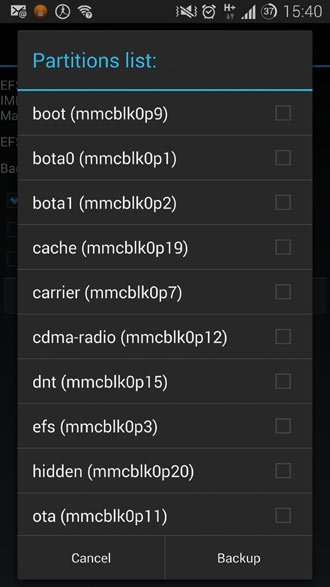
Since EFS backup is so important a thing for adventurous Samsung users, no wonder that there are dozens of tools, apps, and methods that help you secure the EFS partition against accidental loss. At DroidViews, we keep covering such tools and methods at times. Well-known developer Wanam has just released a new tool called Samsung EFS Backup that can easily backup and restore EFS data on all Samsung devices.
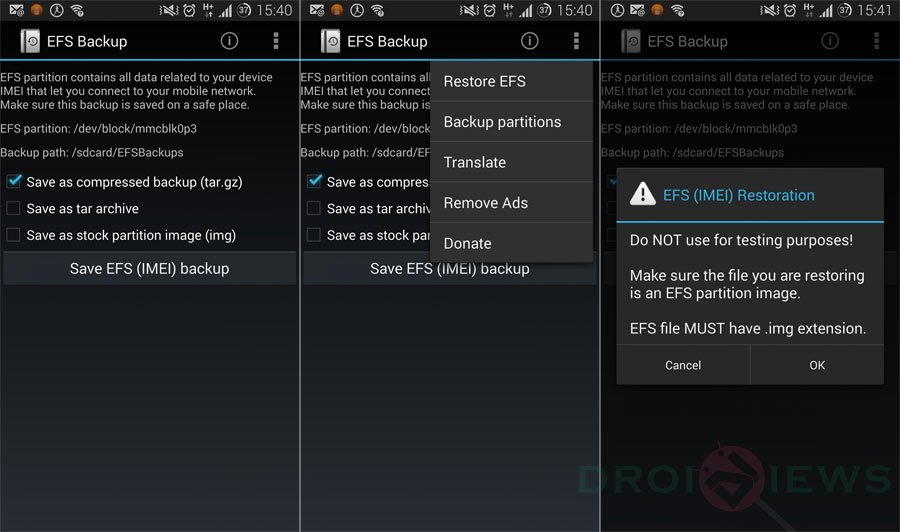
Samsung EFS Backup is a very simple app with just a few options that involve backing up EFS as .tar.gz, .tar and .img formats and restoring it when you need. Since the app requires access to system partitions, your phone must have root privilege to use the app. While most other EFS backup tools work only of the stock Samsung firmwares, Samsung EFS Backup works on CM and AOSP based ROMs too. The backed up EFS files are saved on /Sdcard/EFSBackups on your device.
To download and install Samsung EFS Backup app from the Google Play store, just click the link below.
[googleplay url=”https://play.google.com/store/apps/details?id=ma.wanam.efs”]


Well, there are many android data recovery app could help, and I think Coolmuster Lab.Fone for Android really works great, you can use it to recover lost sms, contacts, photos, videos, etc, have a try!
So backing up EFS saves IMEI from damage too, Right?
No, but you will be able to fix IMEI issue if you have a backup.