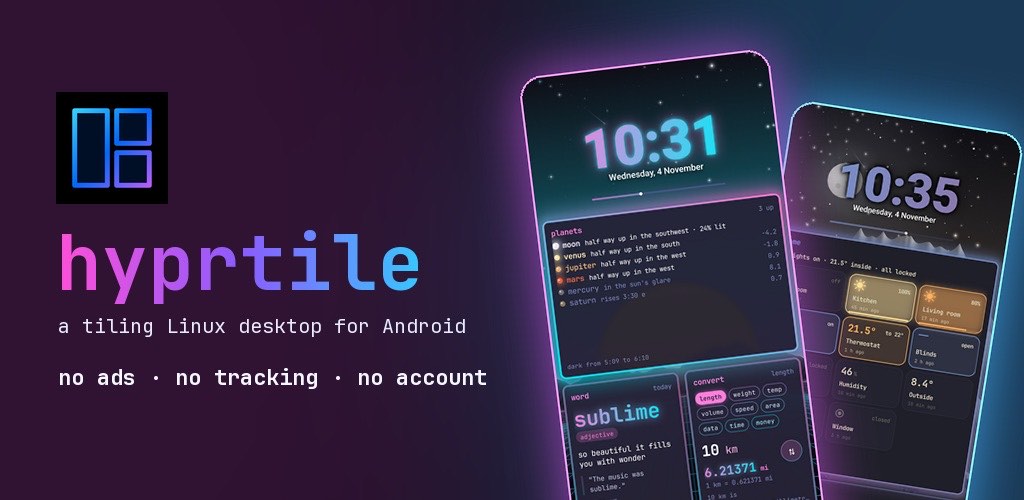
If you have ever scrolled through r/unixporn and wished your phone looked like one of those setups, with glowing window borders, a status bar full of workspace pills and a terminal tucked in the corner, you are not alone. Tiling window managers like Hyprland have made the Linux desktop one of the most customised places in computing. Your phone’s home screen, by comparison, is usually a grid of icons.
Hyprtile is a launcher that tries to close that gap. It turns your Android home screen into a tiling Linux desktop, inspired by Hyprland, Omarchy and the kitty terminal. Here is how it works and how to get a good looking setup in a few minutes.
Widgets become windows
The core idea is simple: everything on your home screen is a window. Windows are arranged in a dwindle layout, the same style many tiling window managers use, with gaps between them, gradient borders, shadows and blur. You can swipe between named workspaces, just like switching workspaces on a desktop.
There are windows for the things you check every day: a big clock, weather, a calendar, notifications, pinned apps and a btop style system monitor. There are also fun ones, like a cava style audio visualizer, a word clock, snake, QR codes, tldr pages, air quality and pollen, a habit tracker and a notepad.
A waybar, a terminal and a launcher
Across the top sits a waybar, with workspace pills, the clock, battery and system stats. There is a small kitty style terminal that runs fastfetch and a little shell, and a rofi style launcher that finds any app as you type. If you use Linux, all of this will feel familiar right away.
Start with a preset
The quickest way to a nice setup is the presets. There are ten of them, and one tap changes the wallpaper, colours, glass, borders, fonts and clock all at once, from calm camel and navy to osaka jade, liquid glass and bold neon. Pick one you like and tweak from there.
Then pick a theme
Hyprtile comes with 34 themes from the ricing scene, including Tokyo Night, Catppuccin, Gruvbox and Nord. You can also choose from five terminal fonts: JetBrains Mono, Fira Code, Meslo, Hack and Caskaydia Mono.
Rice it in a config file
This is the part Linux users will enjoy most. Hyprtile reads a file called hyprtile.conf, written in Hyprland’s own syntax, and reloads it live. You can change gaps, borders, rounding, blur, shadows and even the bezier curves used for animations, then watch the home screen update as you save.
Music and a quick pull down
A music player window, styled after cliamp by Bjarne Øverli, comes with built in radio: Lofi, Synthwave, Chiptunes, Phonk and more. Pull down on the home screen for your toggles, the player and your notifications. You can also lock home in portrait or landscape, and, if you choose to turn it on, double tap empty space to lock the phone, with fingerprint and face unlock still working as normal.
Privacy
Hyprtile has no ads, no analytics and no account. Notifications, calendar and contacts are only read on the phone, and only if you allow it. Weather and air quality use your location rounded to about 1 km, again only if you allow it, and none of it is sent to the developer.
Optional extras
The app is a one time purchase with no subscription. An optional Pro upgrade adds things like Android widgets from your other apps as tiled windows, an RSS news window riced like newsboat, rain radar, 26 more themes, icon pack support and a Health Connect window for steps, heart rate and sleep. Everything described above works without it.
Who is it for?
If you love a clean, keyboard driven Linux desktop, or you simply want a home screen that looks nothing like everyone else’s, Hyprtile is worth a try. Search for Hyprtile on Google Play, start with a preset, and then open hyprtile.conf and make it yours.
Hyprtile is an independent app made by a solo developer and is not affiliated with Hyprland, Omarchy or kitty.
Join The Discussion: