If you’re the kind of a social person, you must have used Facebook! So, you must have also come across the ‘Chat-Head’ feature, in the latest Facebook updates! For those of you who don’t know, Chat-Heads are basically a quick-notification type supplement for Facebook, when you’re in a game, or in an app, and someone messages you on Facebook, you will be notified quickly, without the need to opening the application itself. Not only that, but the chat-head is essentially a messenger which takes up a part of your screen, and can be used to send texts, view them, send pictures, and do essentially everything you can do in the application itself. So, this Chat-Head feature was a huge hit, and people loved it for its quick reply system, and how the user doesn’t have to open up the full application itself to reply to the person. You can get chat heads for WhatsApp on Android using the following apps.
But, Facebook isn’t used by all the people across the world. I say all because Facebook already has about a billion users, but what about the left of the world’s population who use social media? Well, I’m sure you use WhatsApp, I use it, in fact, everyone with a smartphone uses it nowadays! But, the whole point of this post is that the awesome App Developers have found a way to port the Chat-Head feature like that of in the Facebook Messenger, to the world-wide used messenger – WhatsApp. Wouldn’t that be great if you had a Chat-Head sitting on your device’s screen, and when you open it, you get a text from someone on WhatsApp?! Well, I don’t know about you guys, but I’m sure I’d love that! The point of Chat-Heads is to minimize the time taken by the user in viewing the message by opening the actual application. Say, you take about 20 seconds to open up WhatsApp and read the text, but with chat heads, it’s just 5 seconds away! So you save 15 seconds of your precious life!
Let’s get to the point again, this article is for the people who want to have the Chat-Head feature for their WhatsApp too, and you’re lucky, because we don’t have just one app, but two! We’re going to explain in detail about the features of both the application in detail, but there’s gotta be one winner, so we’re going to bring out the verdict at the end of the post.
1. Seebye Chat Heads
This application is an extension for WhatsApp to bring the ‘Chat-Head’ feature we talked about earlier. Now, with Seebye, you can access WhatsApp Chat-Heads from any application. I’ve used Seebye Chat-Heads for WhatsApp on my own, and to be frank, the application comes on this list only because it’s a stable one till date! Otherwise, this application is quite laggy, and also takes some time to respond. The good side of this application is that it provides the user with real-time posts, which means there is no delay in the arrival of a message in WhatsApp and this application, while some of the other applications may take up to a minute to do that!
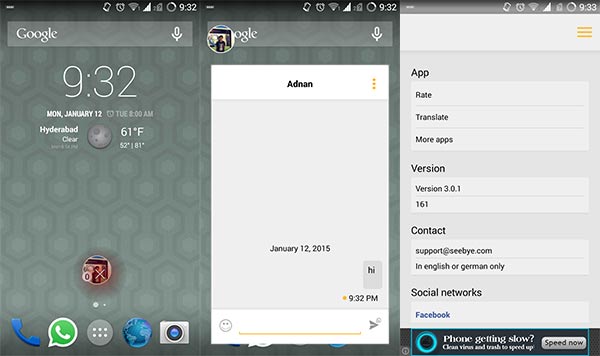
However, there is no paid or a full version of this application. So, that means you are stuck with the miserable ads within the application. Another good point of the Seebye Chat-Heads is its ability to customize the color of the chat heads, which we still miss in the Facebook messenger! The time taken by the chat head to pop out fully is almost 2-3 seconds, which isn’t that great. Seebye is in its very first stages of development, so don’t expect this application to do anything much more than just letting you view the conversation, and reply to it, this time! Another great and remarkable feature of this application is that this chat head doesn’t show your last seen by just viewing the messages! Thank you Seebye, we really needed that! You can get the Seebye Chat-Heads for free by clicking the link down below!
[googleplay url=”https://play.google.com/store/apps/details?id=com.seebye.chatheads”]2. Dashdow WhatApp
Dashdow is another application available on the Google Play Store, by which people can enjoy the chat heads feature from the Facebook messenger on WhatsApp. Dashdow lets the user view the message sent by someone in a glance, without the need to open the WhatsApp conversation. You can even access the notification on your lock screen if you’re too lazy! Anyway, when clicking on the chat head, it opens up a dialog box, from which you can send texts, or read messages, and after clicking on a message, it will redirect you to the WhatsApp conversation. Take a look at the screenshots below to get an idea of how the application looks like:
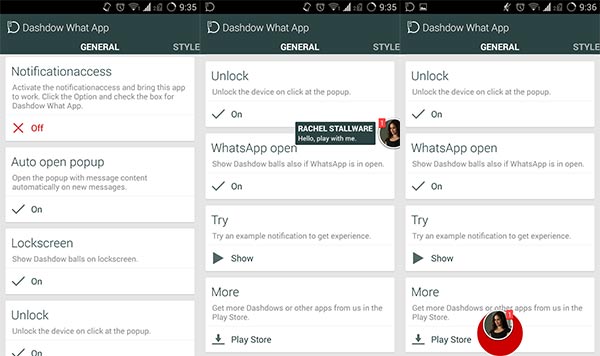
Just like the Facebook Chat Heads, you can add any chat heads for WhatsApp for a specific person or a group. Something remarkable about this application is that when you view the chat head on your lockscreen, just tap the chat head, and it will automatically unlock the device for you! Dashdow currently comes in two versions – a Free one, and a Paid one. But, to access a chat head of an actual person, you need to buy the full version of the application! You can get this wonderful application on the Google Play Store.
[googleplay url=”https://play.google.com/store/apps/details?id=com.stallware.dashdow.whatsapp.lite”]Verdict
Although both the application perform the same function, the Dashdow What App application gives the user more satisfaction. This is because of the reason that the Seebye Chat Heads application is very laggy when compared to the Dashdow What App. On the other hand, the Dashdow What App lacks the ability to personalize the Chat Head, which is a great feature in the Seebye Chat Heads. Overall, since both the applications are supposed to satisfy the users, both of them deserve the try. However, say if both of them were paid ones, We’d recommend you choose the Dashdow WhatApp for the feel of using the chat heads for WhatsApp like the Facebook Messenger.



Join The Discussion: