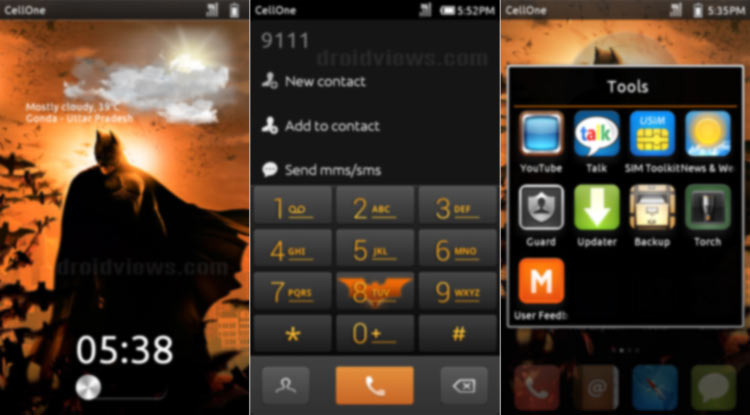
Hello Friends! Here is my fourth theme for MIUI V4 (ICS) ROMs. For a few weeks, I was receiving emails from the user of my last theme “The Dark Knight” for MIUI V4 regarding the update and feedback about the serious bugs that it had. Being busy with my site some personal preoccupations, I could not get time to see your suggestions to improve my theme. The wait is over now, as here is the return of “The Dark Knight theme”. Since the theme comes with major updates and bug fixes, I decided to release it with a different name.
Improvements over the Previous Version:
- The most important thing about this theme is that you will hardly get a visibility bug, namely white on white or black on black. That was really irritating. Now you can easily read names in File Manager, Messaging, and other apps.
- Next, is the theming of the option tabs globally. Now it looks just beautiful (at least to me!).
- I have also added a beautiful analog clock.
- The previous version was just a dark theme with orange highlights. Now you will see the dark night logo all over the theme, dark knight wallpapers on the LS and HS. Moreover, I have also added a live wallpaper of the Dark Knight with water ripple effect (thanks to LiquidRobotics (a friend from XDA) for making the LW for me). Ths is just a modified version of Samsung Galaxy S3 fake Dandelion LW.
- Added the dark background for the Status Bar.
- Many of you complained about the iPhone feel of the previous theme. Now it is free from the iPhone ghost.
- There are many other improvements and fixes. Discover yourself.
- The theme has been tested on the latest MIUI 2.6.8 and 2.6.16.
How to Use Dark Knight Returns Theme
If you are new to MIUI, here are the tips to apply/use the theme:
- Download the “The Dark Knight Returns V4 2.0.mtz”, copy it to internal SD Card/MIUI/Theme path.
- Apply the theme from Homescreen> Themes.
- If you want to use different elements from other MIUI Themes on your device, tap on the “Mixed” tab and apply the desired item.
- If you want to get weather update on the lockscreen as shown in the screenshot, you will have to download and install 9s Weather (Advance) app (download link below) and update it.
- You might see a blank/white background after applying the theme. This is not a bug. A reboot is compulsory for the theme’s graphics element to take full effect.
- If you discover that the font applied in the theme is not showing all characters properly, download the additional fonts from below. Copy the mtz to MIUI/Theme folder. Open Themes> Mixed> Font and apply the font you like.
If you find any bugs, please make sure that you have the latest MIUI ROM v. 2.6.8 or 2.6.16. If not update it first. If you still get some problem, let me know. Do not forget to share your views about my theme via comments and social sites. Remember, sharing and caring.
If you like my themes and want to appreciate my hard work, please buy me a coffee via PayPal:
Download Dark Knight Returns Theme
The Dark Knight Returns V4 2.0.mtz
Additional Fonts for the Theme
Download “The Dark Knight 1.0 Beta” Here



nice one
Thanks, buddy!