
A few days back I was looking for a new news app to suffice my daily dose of news as I was fed up with Feedly. I just don’t like it anymore. From last few updates, it is taking too much time to load news. Anyhow, while looking for another app I found InShorts and Recent News. Now InShorts is somewhat old and quite well known. Recent News is new and looks promising.
Upon launching the app for the first time, it will guide you through the necessary options like how you would like to organize your news (magazine view, newspaper view, headlines only, and multi-column). I went with headlines only. Next you get to select the topics that you want to follow. There are tons of topics to choose from, ranging from technology to business. One thing which I liked a lot is that while selecting a topic it gives you the option to choose sub-topic. F
or example, I choose technology, now it allows me to further choose which topic in technology field I want more news on. It got sub-topics (in technology section) like biotechnology, drones, 3d printing, etc. It’s nothing new, but I was sold by the way this feature is implemented here. This will make it easy to get accurate news about what interests you.
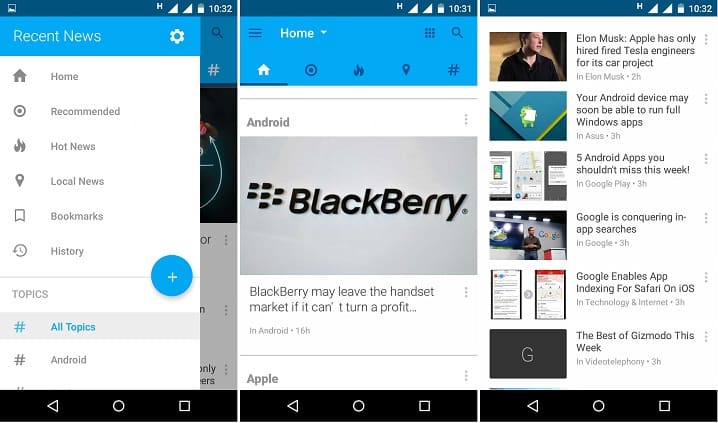
The layout of the app is pretty simple. It is divided into five segments i.e. home, recommended, hot news, local news, and topics. I particularly liked the option for local news. To get accurate news make sure to give it access to your location.
You can swipe between various segments by swiping on the screen. You can also do it from the left sidebar. The sidebar contains shortcuts to all the segments as well as all the topics that you follow. A Floating Action Button (FAB) is present in the sidebar that lets you add new topics.
From the homepage, you can use the search function to search for something. This works even if you are not following that particular topic. So that’s a plus. Another thing which I liked about it is that the news that you read is turned to grey to distinguish between read and unread news.
Another cool feature which is available in the pull-down menu on the home tab that decides the amount of news to show you based on how much time you have. You can choose from “1 Minute Read Time,” “2 Minute Read Time,” and “3 Minute Read time.” The way it works is that it looks at the length of each article in words and calculates how long it would take you to skim it based on an average person’s reading speed and some other assumptions. If you select “1 Minute Read Time” you’ll generally see fewer articles in your Home tab than you would if you select “3 Minute Read Time.”
From the app settings, you can turn on or off option like opening links in the browser, shake to switch topics, sound effects, battery saver, etc.
So that’s Recent News. I really liked the app and I could not find any negative point about it; it’s fast, shows curated news, and gets better over time.
[googleplay url=”https://play.google.com/store/apps/details?id=io.recent.personal.news”/]


Join The Discussion: