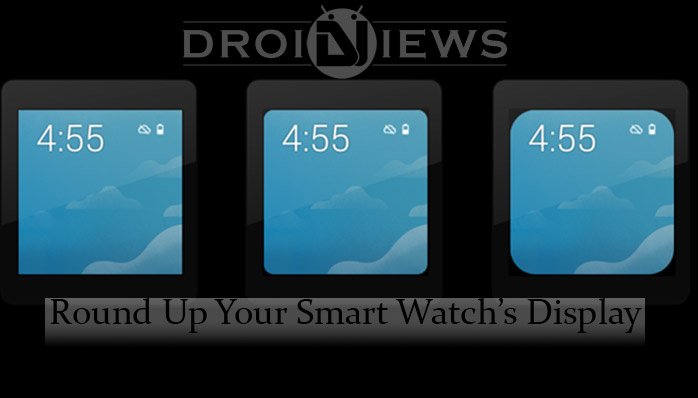
Smartwatches are one of the trending topics nowadays true Android geeks talk about all day long. If you own a watch with a pointed-cornered display, there’s an app called Framer that can add rounded corners to Android Wear smartwatch.
There are currently 6 known Smart watches, which provide the user with an amazing feel in the hand – literally. Namely, the best smartwatches are :
- LG G Watch
- Samsung Gear Live
- Motorola Moto 360
- LG G Watch R (Round)
- Sony SmartWatch 3
- Asus ZenWatch
You may be new to this whole Smart Watch thingy. The concept behind a Smartwatch is its ability to change the look of the watch’s UI, the way time is displayed. The applications which are able to do that are termed as ‘Watchfaces’. With a Smartwatch, one can view their notifications such as a WhatsApp message, or a Facebook notification directly from the Smartwatch, without the need to remove your phone out of your pocket. Getting back to the Watchfaces again, there are a ton of them available on the Google Play Store. But, since there are not many options of buying a proper Smartwatch right now, you may end up getting a bad one, or worse, the square shaped one!
The square-shaped Smartwatches like the Sony SmartWatch 3, suffer a big disadvantage. Square displays look a lot uglier than the round ones. But, don’t worry, in this article, we’re going to review an application for you all. This application, made for square-shaped Smart Watcher is called ‘Framer’. What Framer essentially does is it rounds up your Smart Watch’s display, to make it look more beautiful.
Adding Rounded corners to Android Wear
Once you download and install the application on your Android device, there are two options available – Round 1, and Round 2, the Round 1 being a little bit curved, while the Round 2 being totally round. Not only do you have these two options, but with the Paid version, which you can get on the Google Play Store too, you can set a custom picture as your overlay, to make your Smartwatch look more your’s! However, the recommended size of the image you’re going to set is 320*320 pixels. There isn’t much to describe this amazing application. Test it by yourself, and make your square-shaped Smartwatch look more attractive with the round display with Framer.
You can get the Paid and the Free apps by clicking the following links :
Paid version
[googleplay url=”https://play.google.com/store/apps/details?id=com.chrisxe.framer”]Free version
[googleplay url=”https://play.google.com/store/apps/details?id=com.chrisxe.framerunlocker”]I hope you were able to add rounded corners to Android Wear smartwatch.

Join The Discussion: