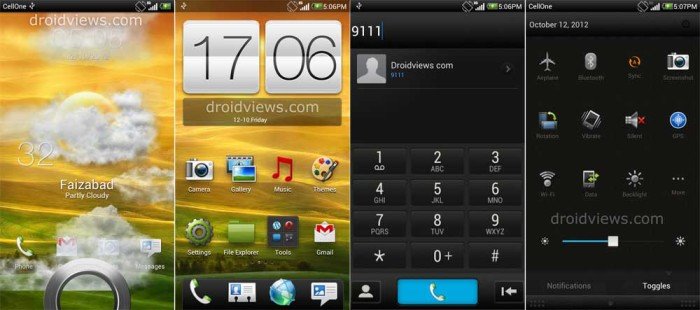
The HTC Sense 4.0 UI has been very popular among mobile phone users regardless of whatever OS they are on. I have already posted a very good Sense 4.0 theme for MIUI V4 called the MiSense 4.0 which was a light theme. Now here is another theme that imitates the Sense 4.0 look very closely. It is a dark version of the Sense 4.0 theme made by a Chinese themer Xiaoshui.
The theme has a very beautiful lockscreen akin to Sense 4.0 and features animated weather. Since the LS and homescreen Sense clock weather data is fetched from Genie Weather Widget app, you need to install it to get weather updates. The theme has a bunch of original Sense icons and a very neat dialer. The status bar and notification panel has also been themed in the Sense 4.0 style.
There were some Chinese texts in the original theme that have been translated by me. The screenshots have been captured on my Samsung Galaxy S3. so it is confirmed that the theme works fine on even 720p devices, even though it has been designed for only 480p.Download the theme and copy to MIUI/Theme folder on the SD Card. Open Themes app and apply.
Changelog Nov. 06:
- Fixed wrong alarm icon at the status bar.
- Fixed white background problem at desk-clock
- Homescreen Sense dock bar visible now.
Changelog Oct. 14:
- Fixed the white background bug in the dialer
- Fixed issue in file explorer
- Other optimizations
Changelog Oct. 14:
- SMS white background and white problem fixed
- Fix alarm clock with white background and white font
- Global secondary window color changed
- Settings interface slightly optimized
- Dial-up panel modified, fixed fuzzy fonts
- Optimized for the latest MIUI ROM
Download Link

I am seeing a minor problem when I press the menu button while on my home screen. The background is dark and translucent, and the icons are dark as well. I think this started after an update to MiHome launcher. I’d enclose a screen shot but Disqus is not letting me do that on your site.
i can’t apply it on my sgs3.. using miui rom and it says that i didn’t download it from originial site..
Thanks for doing the translation work on this. I am using and liking this theme. I added battery percent and status to the lock screen. I can send the code if you are interested.
I am using this theme with MIHome, running stock Samsung Android 4. One minor thing that doesn’t work is the GMail button on the lock screen. I have tried fixing it but no luck so far.
It is really nice that you have done some modifications to the theme. If you give me the mtz, I shall publish it here for others.
Thanks and regards!
Thank you for the offer. It turns out my modifications are a work in progress! 🙂 I have been slowly modifying different parts. When I get to a good stopping point I will be in touch.
I will wait, Bruce. 😀
Love this theme.. the only problem I have is that for some reason the alarm icon on the status bar shows a 3G with a check mark under it.. I installed the updated 10/30 version without any luck. Any other suggestions? Really I would rather just hide the alarm clock icon all together, but I cannot seem to find anyway to do that yet. I am on 2.10.19 with a GS3.. thanks for any suggestions..
Screen shot please
See attached. The 3g check thing is what I am talking about, haha
Okay, fixing it and will upload in an hour and so. Redownload after 2 hours.
wow, thank you!
it works perfectly now. thank you so much!
Enjoy MIUI! 😀
Hi Rakesh. Are you able to update this theme to the latest MIUI 2.10.19? In this version MIUI changed something in Dialer so its not themed any more by this theme (and any other). The original autor seems to have still an older version of MIUI (stable?) and don’t see this problem.
Since I am still on the older MIUI on SGS3, I am unable to see the changes. Anyway, if you give me the contacts.apk from the ROM, I will modify it.
I got the same problem! Where to send the contact.apk?
Got the APKs from Acid and I will try to fix the bugs ASAP.
I was looking for a complete version of Sense, and now I have it in my MIUI. Thanks a lot!
Enjoy!