In the world of internet, email accounts work like IDs. Weather you want to be forum member, buy something online, sign up for any service or do similar things, an email ID is a compulsory thing. To avail all Google services on your Android device, you must have a Gmail account. Most of us own more than one email accounts and we all want to keep ourselves updated with every new mail that hits the inbox.
There is no problem in having multiple email accounts but signing into these accounts each time you want to access them is really a tiresome job. Wouldn’t it be great if we are able keep an eye on and manage all our accounts from a single interface? Being able to do this will not only be convenient but also save your time. Thankfully, there are some good apps for Android that let you do the job easily and efficiently.
Today we shall consider two all-in-one email apps that can help manage and view your multiple email accounts right from there user interface. All you have to do is to install any of these apps and sign into your email accounts. The apps uses Push technology fetch the email data from your accounts and show them on your device. In this way, you have all your accounts from major email service providers like Google, Yahoo, AOL, Yandex, Microsoft Exchange, Outlook, Windows Live and any other service provider with POP3/IMAP support.
SolMail
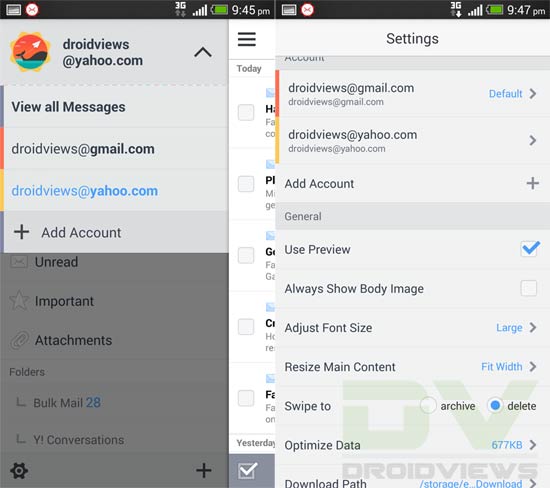
Another nice email manager app that deserves mention here is SolMail. Comparatively, it’s a new app and has Holo light UI that looks pretty much similar to the older version of Gmail app for Android. SolMail lets you view multiple email accounts from various service provides and supports categorizing your emails with four types of filters. The app also features a mail widget for your home screen that shows all new mails.



Join The Discussion: