Truecaller is an amazing and popular app that shows you contact details of unknown numbers right on your smartphone whenever you dial or receive a call. The Truecaller network crowdsources contact details of the users from their smartphone’s contact database. In layman terms, if someone installs Truecaller app and provide necessary permissions, all the contacts in their device will be added to Truecaller central database. So, don’t be scared even if you see your contact details in Truecaller even though you never used it.
Well, it might be a bit scary that your contact details are out to the public and anyone can easily lookup using your name or contact number. Moreover, Truecaller sometimes lists your home address and other details as well (maybe someone saved your home address in their phone contacts?). I’ve also noticed that few of the landline numbers show home address details and other sensitive information which you might not want to share in public.
I’ve been using Truecaller for several years but never been bugged by strangers or spammers. However, many users contacted me on Facebook and Hangouts querying about how to get out of Truecaller network and delete their number from Truecaller database. Unlisting from Truecaller is quite simple and you can do it in a couple of minutes. According to Truecaller, if someone unlists from their network, their contact details won’t be shown on Truecaller app but you should not be using the app either.
Unlist Your Number from Truecaller
So, if you have no plans of using Truecaller on your smartphone, here’s is how to unlist your number from Truecaller.
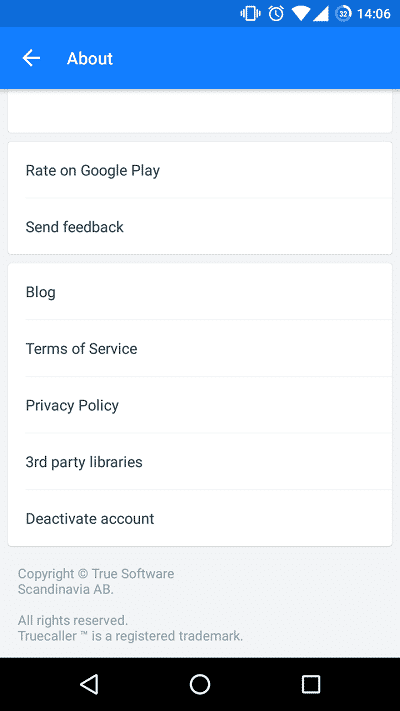
- Open the Truecaller app on your Android device. Tap the hamburger icon (three horizontal lines) in the upper left corner » Settings » About » Deactivate account.
- Now, visit the Truecaller Unlist Page.
- Enter your phone number along with the correct country code in the respective field.
- Select the reason for unlisting from Truecaller and key in the verification captcha.
- Finally, click on the Unlist button.
Truecaller takes around 24 hours to unlist your number from their database. So, check your number from your friend’s Truecaller app and see if it worked.



Join The Discussion: