Yes, that’s right! Google has recently launched a brand new Play Store after pretty much of leaks that we saw around. Google has been in the limelight since it made the books and movies available for us in last couple of months. The newly launched Play Store is what caught our attention this time!
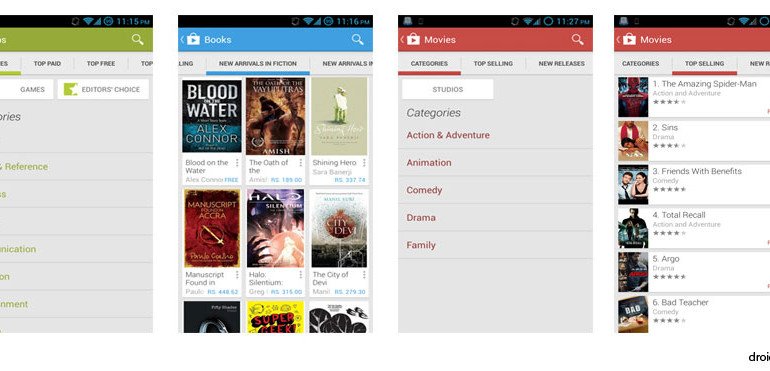
The first impression is a cleaner and brighter user interface. Neatly organized categories looks great. Finding your app seems much faster and easier now. Use of images is increased and you can see bigger images jumping off the page but in an organized manner. We found the new user interface to be much inspired by Google Now. The cards interface is pleasing for the apps categories, movies, and books. What’s more! The similarly themed contents are listed together and as you scroll down through the similar apps, the list just keep getting longer so there is always more to see and explore. Google said they have focused on simplicity this time. At the same time, it will help you find the right entertainment fast. The purchasing also is now simplified and fast so you can get to your content in a ‘breeze’, said Michael Siliski. For a better play store experience, Google had recently cleared 60,000 dubious apps from the store back in February, showing the concern about their users.
Michael Siliski, Group Product Manager for Google Play, also confirmed the roll out will begin over the next few weeks so if you aren’t seeing the new play store, don’t worry. Update could happen any day soon for you. The update is supposed to happen for the devices running Android version 2.2 (Froyo) or later only.
If you cant wait for the update to happen itself, we have managed to grab the apk just for you!
How to install the apk file:
- Download the apk file
- Put it inside your micro SD card or internal storage (if not downloaded from your phone),
- Go to the apk file and install it.
For Users, using Android 4.0+
- On your phone, go to Settings–> Security–> scroll down and check the “Unknown Sources” check box. Then tap OK.
For rest of the Android users,
- On your phone, go to Settings–> Applications–> and check the “Unknown Sources” check box. Then tap OK.
- Navigate to your apk file from a file manager and tap on the file.
- Tap on install, and enjoy!
Some screenshots:
Black Themed Google Play Store:
If you got a rooted Android phone and have CWM recovery on it, you can enjoy the black-themed version of the Play Store app that has been modded by B-boy™. The app is available as a CWM flashable zip. Download it from below, copy to your phone’s SD card and install via recovery. The detailed guide is here.




Join The Discussion: